Tracking your dictation Insights
Insights allow you to see exactly how much dictation is saving you, with your words, streaks, and speed all tracked automatically as you use VoicePilot.
The section opens on Your usage. A second tab, Your voice, is waiting on voice analysis that isn't available yet.
📊 Your Usage
Open Insights and the first tile is Words dictated, counted for all time. Underneath it sits the share of that total you dictated this month. Beside it you'll find your Dictations and the Time saved compared to typing it all out by hand.
You'll also find your Avg. per dictation, your Current streak with your longest run underneath it, and your Words per minute, expressed as how many times faster that is than typing.
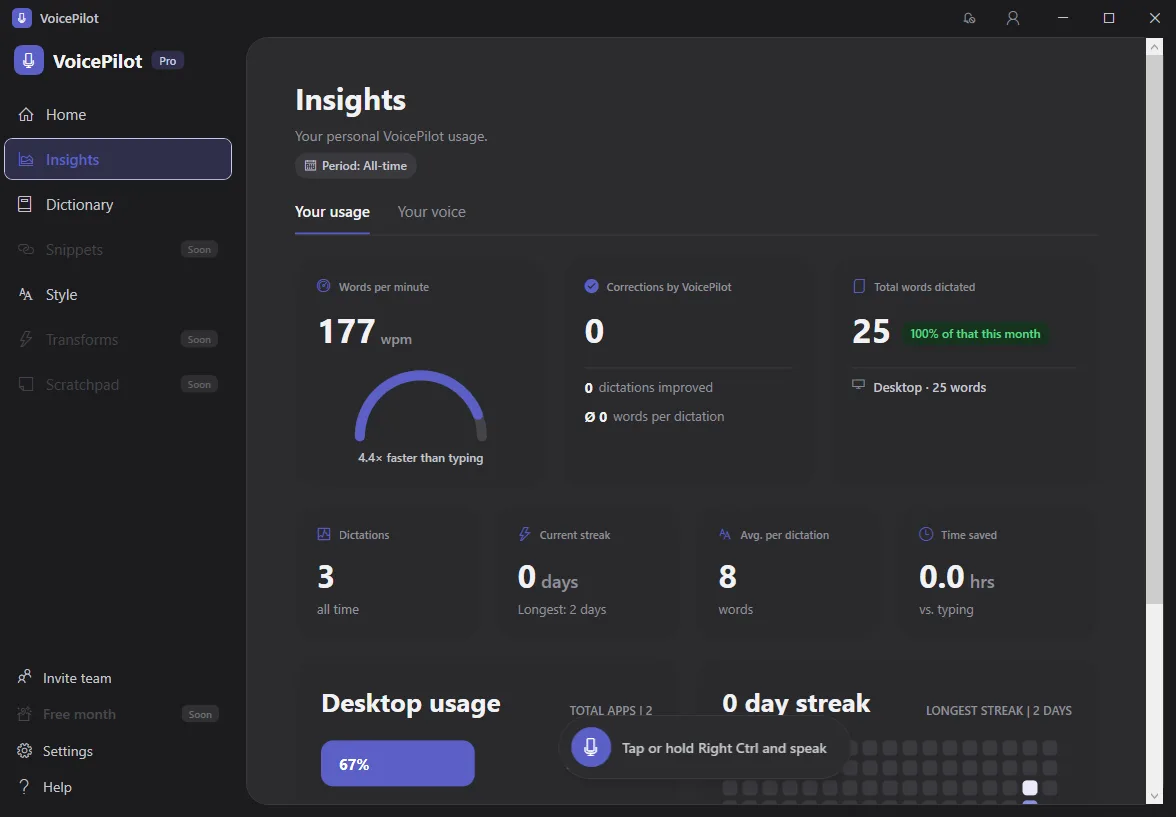
Below the tiles, an Activity grid shades every day you've dictated, from Less to More. A habit shows up as a solid run rather than a number you have to interpret.
💡 These insights come from your local dictation history on this device, so a second computer keeps its own separate set of numbers.
🖥️ Desktop Usage
The Desktop usage panel breaks your dictations down by app, with a total app count alongside. It's the quickest way to see where you're dictating most.
Anything VoicePilot couldn't identify is listed as Unknown app rather than being quietly dropped from the total.
It's also where you'd spot an app worth giving its own Style Preset.
✅ Corrections by VoicePilot
The Corrections by VoicePilot panel shows how many of your dictations VoicePilot improved during cleanup, along with the average words per dictation.
Once you've built up some history, it shows how much the cleanup step is doing for your text beyond the raw transcription.
If you haven't dictated anything yet, Insights shows a No insights yet empty state instead, since there's nothing to calculate before your first dictation.
⛑️ Need more help?
Get further assistance with VoicePilot through our support chat widget within the app, or reach out to us at support@solutions2share.com